In 2020, company websites are not just about delivering information anymore. As interactivity on the web increases through the use of social media, customers have come to expect that same level of interactivity from the websites they frequent. Think of your website as a micro-experience: instead of simply handing your customers a list of office hours, you’re now engaging them and involving them in an experience they’re more likely to remember the next day.
With the advent of WebGL, larger or tech-savvy companies have been quick to take advantage of 3D web graphics. The examples are endless. Here are some of my favorites from this awwwards.com list:
As I described in a previous blog post, I’ve used 3D graphics to bring my website to life and showcase my skills. I want to bring this tool to the people that really need it: small business owners. Sell a hand crafted product? Well, you could always throw a few photos on your website… or… you could use a custom 3D representation of your product that customers can interact with. Since these 3D graphics are created using JavaScript, your 3D graphic can be created with special “smart” rules built in. Let’s suppose you’re an architectural firm and want your front page to display a 3D representation of your latest build. Well, using JavaScript, I could make the scene dependent on the season: if it’s the dead of winter, there could be snow on the roof. The middle of summer: a bright blue sky. Your imagination truly becomes the limit!
Over the summer, I was looking through some old components, and discovered my old XBox Kinect (the second one). I had been using it for motion capture and depth sensing experiments dating back years at this point, but it had never truly shined as a star of any one specific usage. I had recently started teaching myself some three.js coding, and I had a craving for making cool 3D stuff happen in-browser. You know… things that you could share with friends, family and the world that would solicit the occasional “wow”. I got to thinking… what if the Kinect could somehow display its depth information in-browser… in three.js space?
Well, I was about to get my answer. For starters, one of three.js’s official examples is how to display XBox Kinect data in-browser. This, at the very least, gave me hope. Then I stumbled upon Kinectron: an actual program designed to stream live XBox Kinect data over a network! Setting this up was not hard at all; there was simply a “server” program that acts as the… well… the server, and a client-side API for accessing the data. Now, all I needed was a way to get the Kinect data into a three.js instance…
So I googled that, too! I found Three-Kinectron (by the same people), which did exactly that: it is a Javascript library that allows a three.js instance to access live Kinectron data! Now, all I had to do was combine the three, which I did: three.js, Kinectron, and Three-Kinectron. I created a page based on the Three-Kinectron examples that referenced and pulled data from the Kinectron client and displayed it in 3D space! When I pulled depth information, things became exciting. I could see a live 3D representation of my surroundings on screen, in Google Chrome! How cool is that?
The last step I took was to create a WebVR instance in three.js to display the Kinectron data in. A WebVR instance is just what it sounds like: it is virtual reality in-browser. It can be viewed on a desktop by navigating with a mouse, but it is predictably cooler to view in a VR headset. I started the stream, did some port forwarding so that my phone could access the stream, and pulled out my Samsung GearVR to view the live Kinect Stream. And voila! I was standing inside a virtual representation of the room. In the future, I could see a setup like this being used for virtual telepresence. Think about it… if two of these sensors were used (one for each person), and streamed via VPN to a central three.js instance in-browser… indeed, even now, if I had two Kinect sensors on hand, I could literally create two Kinectron instances in three.js: one from each Kinect! I find it interesting that such a complex notion can be achieved with simple items that many people have in their own homes already. Maybe someday, this could all be streamlined, and we can stand face to face with a live, high quality 3D representation of our friend across the country from us.
Whether you own a business, need to promote yourself, or run a nonprofit, owning a website that suffers from bad web design is a terrible disadvantage. The first New Flight Digital website was designed in Adobe Muse, a now-discontinued WYSIWYG (what you see is what you get) website designer. I knew there were many disadvantages to using such a program (less creative freedom, lack of direct control over content, etc), but like so many others, I simply lacked the know-how to launch into building my own website from scratch. Until I started Googling… and googling… and googling…
I knew a revamped New Flight website would need to showcase some of our products, and the many eye catching 3D graphics and effects we have produced. It would need to be big, bold and colorful, like the company. I started looking to other similar (albeit larger-name) players in the VFX industry for inspiration. Digital Domain, for example, has a front page with pleasing motion graphics, large hero-shots of their work, and a unified color scheme.
Digital Domain’s website includes attractive features and large imagery
With next to no idea where to begin, I started with an open source HTML template and opened it in Adobe Dreamweaver. Quick, rapid google searches were my go-to as I learned the ins and outs of HTML and CSS. But I soon realized that the things I wanted to display on the website could not be accomplished with HTML alone. You see, websites like the one I had in mind are the result of the interplay between HTML and CSS files, Javascript, PHP, and other elements, all interacting. The latter two are scripts… files that are intended to execute in order to accomplish something. In order to execute PHP, I needed to set up a web server, since PHP runs on the server itself. Try to view a “.php” file without hosting it on a web server, and it won’t do anything, because there’s no server to run it. Javascript on the other hand executes “client side”, meaning it executes in the viewer’s browser, and not on the server.
PHP- Server-side code (script)
Javascript- Client-side code (script)
HTML- What web pages are ultimately made of
CSS- Cascading Style Sheet; how web pages know what to look like
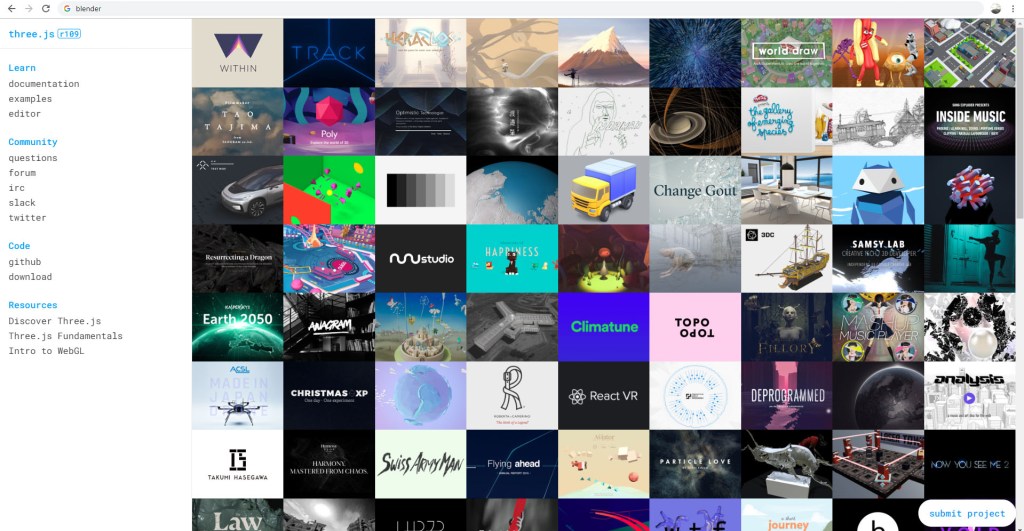
After setting up a local testing environment with XAMPP, I quickly mocked up some design ideas. Any files I edited and saved would automatically update on the web server, since I was editing them directly. This was extremely useful for up-to-the-moment updated views of the website code. I knew I needed some 3D elements on the website. After all, that’s what we do. Why not have some cool 3D objects for the user to interact with? For this, after some googling, I used three.js, a 3D Javascript library. Think of it like a set of files that allows you to create 3D scenes in Javascript. I dug in, and spent months working on a front page 3D scene using Blender to create assets.
Three.js is an incredible library behind some impressive web design
But there was so much more! I needed a contact form, a downloads page, a blog slider, and other elements. For all of them, I either used PHP or Javascript to deliver the information to the viewer. If a script needed direct access to server elements, I used PHP, since it ran on the server, and therefore could access the server files. If something needed to be rendered by the client, I used Javascript, since it ran on the user’s computer.
In the coming months, I hope to share details of how I accomplished certain aspects of my website. All it took was googling… and patience. If you have those two things, you can create an entire website without costly alternatives, and have complete control over how it operates, what it does, and everything in between. Leave some comments below about what element of the new website you would like explained, or shoot an email to contact@newflightdigital.com.
Processing…
Success! You're on the list.
Whoops! There was an error and we couldn't process your subscription. Please reload the page and try again.



 New Flight Digital Blog